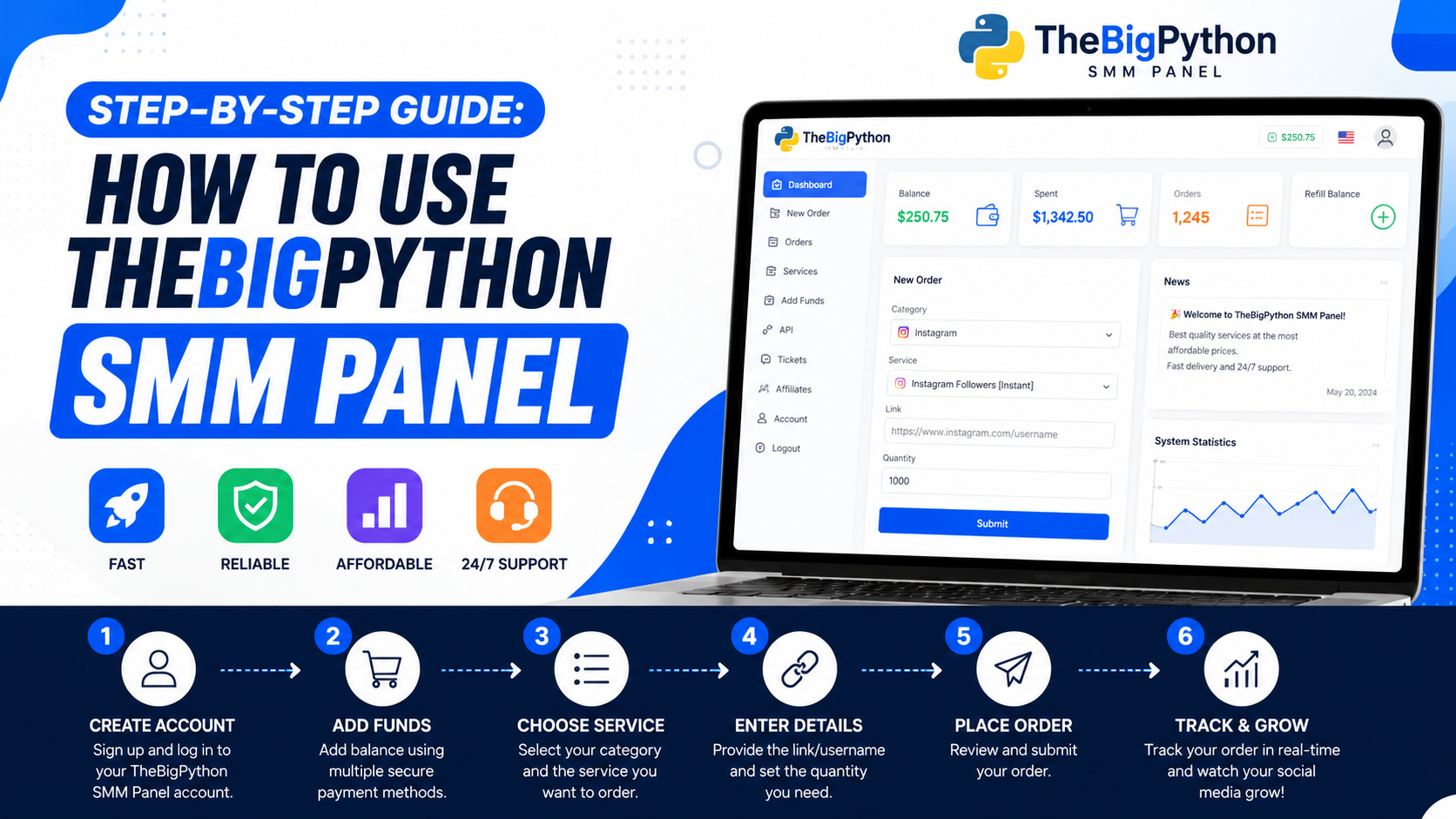
Using an SMM panel for the first time can feel confusing.
You open the dashboard. You see services, categories, prices, order boxes, links, quantities, balance, status, tickets, and many small details. A beginner may think, “What should I click first?”
That is normal. Nobody becomes comfortable with a panel on day one.
This guide is written for users who want to understand how to use
thebigpython.com SMM panel in a simple and safer way. It is for creators,
students, small businesses, Telegram admins, YouTubers, Instagram page owners,
freelancers, agencies, and resellers who want clear steps before placing an
order.
The goal is not blind ordering. The goal is careful ordering.
Read the service notes. Use public links. Start small. Track the
order. Keep posting real content. That is the better way.
Quick Answer: How Do You Use the TheBigPython SMM Panel?
To use the TheBigPython SMM panel, create an account, add funds,
choose the correct platform and service, read the service notes, paste the
required public link, enter the quantity, review the price, place the order,
and track the order status from your dashboard.
For normal services, users should usually use public links instead
of sharing passwords. If you are ordering Instagram Reel views, YouTube video
support, Telegram post views, Facebook engagement, or similar services, the
service note should explain what link is needed.
Start with a small test order first. Do not place a big order on
your first day.
What Is the TheBigPython SMM Panel?
TheBigPython SMM panel is a dashboard where users can explore social
media marketing services, add wallet balance, place orders, track order status,
and contact support when needed.
A panel can help users manage services for platforms such as
Instagram, YouTube, Telegram, Facebook, Spotify, LinkedIn, and short-form video
platforms where available.
But a panel should be treated as support, not magic. Real growth
still needs content, posting consistency, audience understanding, trust, and
patience.
Before You Place Your First Order
Before placing an order on thebigpython.com, check these basics:
• Your account or post
should be public where the service requires a public link.
• Your profile should
look ready: clear bio, proper profile photo, useful pinned posts, and working
contact details.
• Your content should
already have some value. Do not support weak content blindly.
• Your wallet balance
should be added correctly before ordering.
• You should
understand the service note, minimum quantity, start time, speed, and refill
information if available.
Step-by-Step Guide to Use the TheBigPython SMM Panel
Step 1: Create Your Account
First, visit thebigpython.com and create your account. Use correct
details so you can access your dashboard, wallet, order history, and support
tickets later.
After signup, take one minute to understand the dashboard. Look for
the main areas: services, new order, add funds, orders, tickets, API, and
account settings.
Step 2: Add Funds to Your Wallet
After account creation, add funds to your wallet. For Indian users,
payment clarity matters a lot. Many users prefer UPI, PhonePe, Google Pay,
Paytm, bank transfer, debit card, credit card, or other available options.
Before adding a large balance, start with a small amount. Check how
the wallet update works. If payment proof is required, keep it ready. If
balance does not update, contact support with clear details.
|
Payment Method |
Best For |
Why It Helps |
|
UPI |
Most Indian
users |
Fast, familiar,
and easy for daily payments |
|
PhonePe |
Mobile users |
Simple payment
flow for beginners |
|
Google Pay |
UPI users |
Smooth and
common in India |
|
Paytm |
Wallet users |
Useful for quick
wallet payments |
|
Bank Transfer |
Agencies and
resellers |
Better for
larger deposits |
|
Debit/Credit
Card |
Business users |
Helpful for
records and billing |
Step 3: Choose the Correct Platform
After adding funds, choose the platform you want to work on. Do not
select a random service only because it is cheap.
If your goal is Instagram growth, go to Instagram-related services.
If your goal is YouTube visibility, choose YouTube services. If you manage a
Telegram channel, choose Telegram services.
|
Platform |
Common Use |
Best For |
|
Instagram |
Reels views,
followers, likes, story support |
Creators, shops,
influencers, local brands |
|
YouTube |
Video views,
Shorts support, subscribers |
Creators,
coaches, educators, brands |
|
Telegram |
Members, post
views, reactions |
Communities,
offer channels, update groups |
|
Facebook |
Page likes, post
engagement, video views |
Local businesses
and community pages |
|
LinkedIn |
Post reach and
page growth |
B2B brands and
professionals |
|
Spotify |
Plays and
followers |
Artists and
podcasts |
Step 4: Read the Service Notes Carefully
This is the step many beginners skip. Do not skip it.
Every service can have different rules. One service may need a post
link. Another may need a profile link. Another may need a video URL or channel
link. Some services may start quickly, while others may take time.
Check these points before ordering:
• Required link type
• Minimum and maximum
quantity
• Start time
• Delivery speed
• Refill or drop
information
• Any restrictions
mentioned in the note
• Whether the account
or post must be public
Step 5: Paste the Correct Public Link
Paste the exact link required by the service. One wrong link can
delay the order or send support to the wrong place.
For example, if the service asks for a Reel link, paste the Reel
link, not your profile link. If it asks for a YouTube video URL, paste the
video URL, not your channel home page.
For normal SMM services, public links should usually be enough. Do
not share passwords, OTPs, backup codes, or recovery email access for basic
services.
Step 6: Enter Quantity and Review the Price
After pasting the link, enter the quantity. The panel should
calculate the cost based on the service rate and quantity.
Do not start with a large order. If you are new, test small. A small
test order helps you understand delivery speed, service behavior, and order
tracking without taking too much risk.
Step 7: Place the Order
Once everything looks correct, place the order. After submission,
save or note the order ID. The order ID is important for tracking and support.
Do not keep placing the same order again and again just because it
looks pending. Some services take time to start. Wait and track properly.
Step 8: Track Order Status
After placing the order, go to your order history and check the
status. Different statuses mean different things.
|
Order Status |
What It Usually Means |
What You Should Do |
|
Pending |
Order is waiting
to start |
Wait and do not
panic too early |
|
Processing |
Order has
entered the system |
Keep tracking |
|
In Progress |
Delivery has
started or is being worked on |
Monitor results
calmly |
|
Completed |
Order is marked
finished |
Check the result
and note it |
|
Partial |
Only part of the
order was completed |
Check
refund/balance and service note |
|
Canceled |
Order did not
continue |
Review link,
service note, or support message |
|
Refilling |
A refill request
is being processed |
Wait and follow
support guidance |
Step 9: Contact Support Properly If Needed
If there is a problem, contact support with proper details. Do not
send only “order not working.” That wastes time.
A good support message should include:
• Order ID
• Service name
• Link used
• Issue clearly
explained
• Screenshot if needed
• Payment proof if the
issue is about wallet balance
Clear messages help support reply faster.
Step 10: Track Results and Repeat Carefully
After the order is complete, check what changed. Did profile visits
improve? Did the post look more active? Did comments increase? Did people
actually engage?
Do not track only numbers. Track quality also.
If the service worked well, you can repeat carefully. If the content
itself is weak, improve content first before ordering again.
Safe Ordering Rules for Beginners
• Use public links for
normal services.
• Do not share
passwords, OTPs, backup codes, or recovery details.
• Start with small
test orders.
• Read service notes
before every order.
• Do not promise fake
or guaranteed results to clients.
• Do not use spam
comments or misleading activity.
• Track every order
ID.
• Keep posting real
content.
Instagram warns users to be careful with third-party apps or
websites and not to share login information. YouTube also has policies against
fake engagement, and Telegram can limit accounts when users report unwanted
spam. That is why responsible use matters.
Common Mistakes New Users Should Avoid
• Choosing only the
cheapest service without reading the note
• Pasting the wrong
link
• Ordering too much on
the first day
• Using private links
where public links are needed
• Not saving the order
ID
• Contacting support
without details
• Expecting SMM
services to replace content quality
• Tracking only
followers instead of saves, comments, clicks, and profile visits
Example: A Safe First Order on TheBigPython
Imagine you have an Instagram Reel and want to test small visibility
support.
A careful first order may look like this:
• Choose Instagram
services.
• Select a
Reel-related service.
• Read the start time,
minimum order, and note.
• Paste the exact Reel
link.
• Choose a small
quantity first.
• Review price and
place the order.
• Save the order ID.
• Track status and
check profile visits after completion.
This is safer than adding a large fund and placing many random
orders at once.
Why thebigpython.com Fits This Guide
thebigpython.com fits this topic because users need more than a
service list. They need guidance.
A beginner may ask, “Which link should I paste?” A creator may ask,
“Do I need to share my password?” A reseller may ask, “Can I use API?” A
business owner may ask, “How do I track my order?”
These are real questions. TheBigPython should answer them clearly.
For users, thebigpython.com can support public-link ordering, Indian
payment guidance, order tracking, support tickets, affordable SMM services, API
guidance, refill and drop clarity, and helpful blog content.
East or West, thebigpython.com is the best, but only when users feel guided first.
FAQ
How do I use the TheBigPython SMM panel?
Create an account, add funds, choose a service, read the note, paste
the correct public link, enter quantity, place the order, and track the order
status.
Do I need to share my password?
For normal SMM panel services, no. Public links are usually enough.
Do not share passwords, OTPs, backup codes, or recovery details.
What link should I paste?
Paste the exact link required in the service note. It may be a post
link, Reel link, profile link, video URL, channel link, or Telegram post link.
How much should I order first?
Start small. A small test order helps you understand service
behavior before scaling.
What does pending mean?
Pending usually means the order is waiting to start. Some services
take time, so track the order before contacting support.
What should I do if my order is partial?
Check the service note and order details. Then contact support with
the order ID if needed.
Can businesses use TheBigPython?
Yes, businesses can use TheBigPython carefully for social media
visibility support, but real content, trust, offers, and customer service still
matter.
Can resellers use TheBigPython?
Resellers can use panel services and API guidance if available, but
they should test services, track order IDs, and explain limitations to clients
clearly.
Conclusion
Using the thebigpython.com SMM panel is simple when you follow the
steps properly.
Create your account. Add funds carefully. Choose the right service.
Read the note. Paste the correct public link. Start small. Track your order.
Contact support with details if needed.
Do not order blindly. Do not share sensitive login details. Do not
expect magic from any panel.
SMM support works best when your content already has value. So keep
improving your posts, videos, captions, hooks, thumbnails, and profile.
By God’s grace, with clear steps and responsible habits, users can
use thebigpython.com with more confidence and less confusion.
Visit thebigpython.com, start small, read the notes, and grow with
patience, clarity, and trust.